Secret Santa Email Templates: 7 Messages to Copy and Send
Free printable
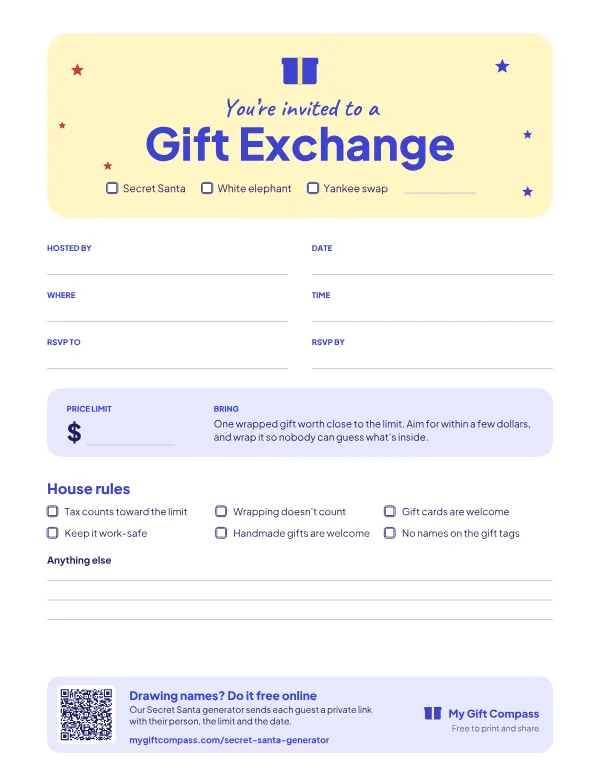
Gift exchange invitation
A one-page invitation with the format, date, place, price limit and house rules. Fill it in, then print it or send the PDF.
Most Secret Santa confusion comes from one missing detail. Someone didn't see the price limit, didn't know gifts should be wrapped, or thought the party was on Friday. The fix is a handful of short, clear messages sent at the right time, each repeating the details that matter.
Below are seven messages to copy, in the order you'll send them. Each has a plain version that works for friends and family, with notes on changing it for the office. Swap in your own details where you see square brackets. They work as emails, texts or group chat posts, except the one that tells people who they drew, which must always go privately.
Before you write anything
Decide four things first, because every message repeats them:
- The price limit. If you’re unsure, the budget calculator in our guide to how much to spend on a gift exchange gives you a number and a line to paste into the invitation.
- The exchange date, time and place. Or a shipping deadline for a remote group.
- The deadline to join. Usually three to five days after the invitation.
- How names are drawn. In person, by one trusted person, or online.
Our step-by-step guide to how to do Secret Santa covers each decision in more detail.
1. The invitation
Subject: Secret Santa this year? 🎁
Hi everyone,
It’s that time again! Who’s in for a Secret Santa?
- Price limit: $[25]
- Exchange: [Friday 18 December], [7pm] at [Sam’s place]
- Join by: [Friday 4 December] (just reply “I’m in”)
Once everyone’s in, I’ll draw names and each of you will get the name of the person you’re buying for, privately. Please wrap your gift and label it with their name and “From your Secret Santa”.
[Your name]
For the office: add “Joining is completely optional, so no pressure if it’s not your thing.” and “Please keep gifts suitable for work.” Send it from your own account rather than a team-wide announcement channel, so it reads as friendly, not mandatory. Our office Secret Santa etiquette guide explains why that matters.
2. The join-deadline nudge
Subject: Last call for Secret Santa
Quick reminder: I’m drawing Secret Santa names tomorrow. If you’d like to join, reply today. So far we have [12] people in.
Limit $[25], exchange on [18 December].
Send this the day before the deadline. It catches the people who meant to reply and forgot.
3. The questionnaire (optional, but worth it)
Subject: Help your Secret Santa out
Before I draw names, please fill in these five quick questions so your Santa isn’t shopping blind:
- Favourite snack or treat?
- Coffee, tea or neither?
- A hobby or something you’re into right now?
- Something you’d never buy for yourself but would love?
- Any allergies or hard no’s?
Reply to me directly by [date], and I’ll pass your answers to your Santa without saying who you are.
Five questions get answered. Thirty questions get ignored. If you’d like more choice, our Secret Santa questionnaire has 30 to pick from, plus a fillable PDF people can type into.
4. The draw: telling each person who they got
This one goes to each person separately. Never send it to the group.
Subject: Your Secret Santa 🤫
Hi [Alex],
You’re Secret Santa for [Jo]!
- Limit: $[25]
- Exchange: [18 December], [7pm] at [Sam’s place]
- Their answers: [paste Jo’s questionnaire answers]
Keep it secret, and label the gift “To Jo, from your Secret Santa”.
Writing and sending 15 of these by hand takes a while, and it means you know every pair. Our free Secret Santa generator does this part for you. It draws the names, keeps couples apart and creates a private link for each person that shows only their own recipient, the budget, the date and any wish list you added. You send each link by email, WhatsApp or text straight from the page. Paste the link into this template instead of the name:
Hi [Alex], here’s your Secret Santa link. Open it to see who you’re buying for: [link]
It’s just for you, so please don’t forward it. Limit $[25], exchange on [18 December].
5. The one-week reminder
Subject: Secret Santa is one week away!
Hi everyone, a friendly reminder that our Secret Santa exchange is next [Friday, 18 December] at [7pm], at [Sam’s place].
- Limit: $[25]
- Wrap it and label it with your person’s name
- Lost your name or link? Message me privately and I’ll resend it.
Stuck for ideas? [Link to a gift guide]
The last line is where a link to our Secret Santa gift ideas helps the people who haven’t started shopping.
6. The day-before reminder
Don’t forget your Secret Santa gift tomorrow! [7pm] at [Sam’s place]. 🎄
One line is enough. For an office exchange, send it in the morning of the day before, so people who work from home can bring the gift in.
7. The thank-you
Subject: Thank you, Santas!
Thanks, everyone, for making our Secret Santa so much fun. [The reveal was chaos, in the best way.] Same again next year?
A special thank-you to [name] for hosting.
A thank-you closes the loop and makes people more likely to join next year. It’s also the right moment to ask one quick question: was the limit about right? That makes next year’s invitation easier.
Tips for every message
- Repeat the limit and date every time. People only read the latest message.
- Put the key details in a list, not in the middle of a paragraph.
- Send names privately. A reply-all on the draw message ruins the whole exchange.
- Keep the tone light. It’s a gift swap, not a project deadline.
- Plan the reveal early. If you want a guessing game at the end, say so in the invitation. Our Secret Santa reveal ideas have ways to make the reveal fun.
For more formats if Secret Santa isn’t right for your group, see the main gift exchange ideas guide.
Frequently asked questions
What should a Secret Santa invitation email include?
The price limit, the exchange date and place, a deadline to join, how names will be drawn, and whether gifts should be wrapped and labelled. Mention if joining is optional, which matters at work.
How do you tell people who they drew for Secret Santa?
Privately, one person at a time. Send each name in a separate email or text, or use an online generator that sends each person a private link. Never post the pairs in a group chat.
When should you send a Secret Santa reminder?
About a week before the exchange, and again the day before if it's an office party. The reminder should repeat the date, time, place and price limit.
How do you word a Secret Santa invitation at work?
Keep it light and clearly optional: 'Anyone who'd like to join, reply by Friday. No pressure if it's not your thing.' State the limit and remind people to keep gifts suitable for the office.